

Ship
You have a vault full of organised knowledge and a validated offer with paying early adopters. Now build the thing.
This guide introduces SpecKit, an open-source CLI and skill set available on GitHub, for turning product descriptions into working software. It works with any LLM coding assistant — Claude Code, Codex, Gemini CLI, or whatever comes next. The methodology stays the same regardless of the tool.
What Is SpecKit?
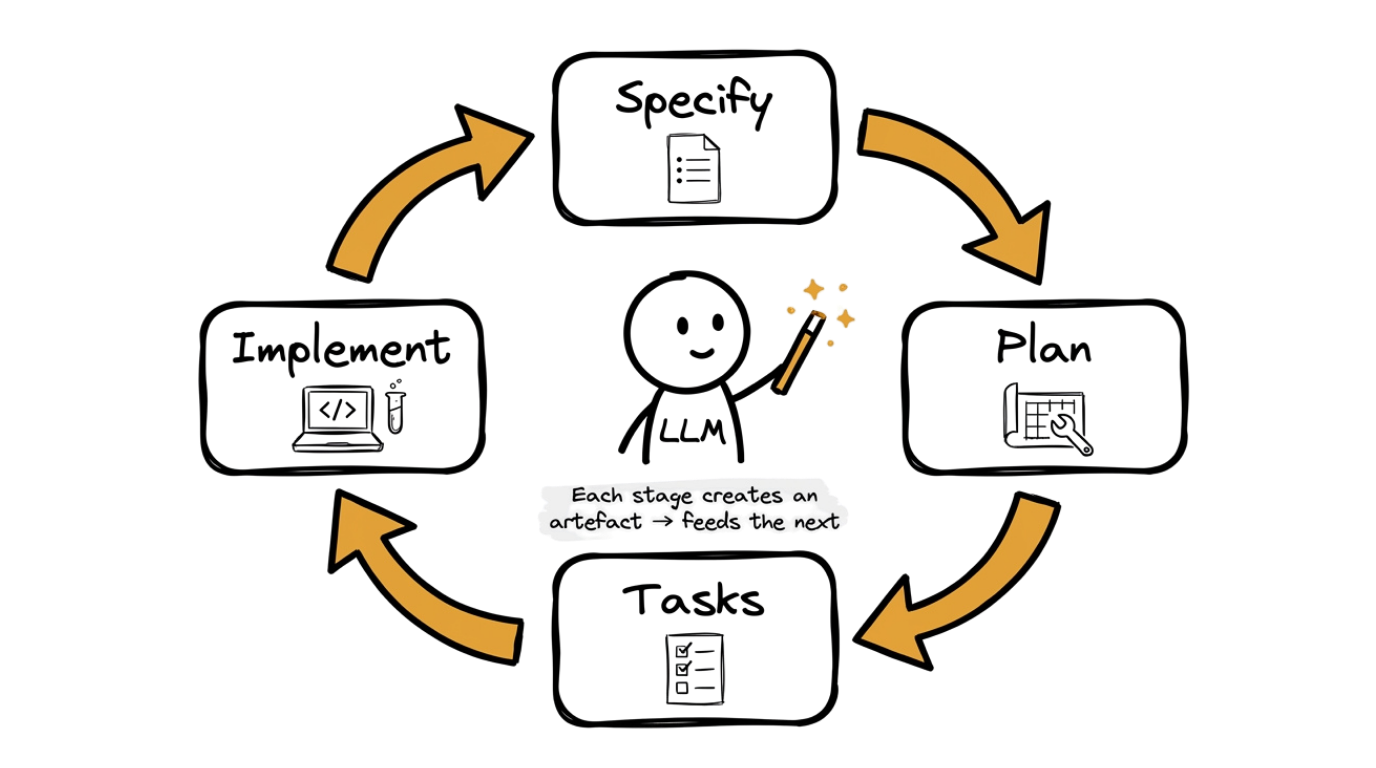
Section titled “What Is SpecKit?”SpecKit is a specification-driven development workflow. Instead of jumping straight into code, you work through a structured cycle that turns a plain-language description into a finished feature. Each stage produces a concrete artefact that feeds into the next, so nothing gets lost in translation between what you imagined and what gets built.
The SpecKit Cycle
Section titled “The SpecKit Cycle”- Specify (
/speckit.specify). Describe what you want built in plain language. Your LLM coding assistant generates a structured specification with an overview, user stories, requirements, and acceptance criteria. - Plan (
/speckit.plan). Your LLM coding assistant reads the specification and produces a technical blueprint: which files need to be created or changed, the implementation order, and any risks or dependencies. - Tasks (
/speckit.tasks). The plan is broken into a flat, ordered list of discrete tasks. Each task is small enough to implement and verify independently. - Implement (
/speckit.implement). Your LLM coding assistant works through the task list one task at a time, writing code, running tests, and moving on.
SpecKit also provides optional commands for when you need them: /speckit.clarify asks targeted questions to fill gaps in your spec, /speckit.analyze validates consistency across your spec, plan, and tasks, and /speckit.checklist generates a custom verification checklist for your feature.
The four stages form a loop. After implementing a feature, you may discover that the spec needs updating, or that the plan should change for the next feature. This is expected. The spec is always the source of truth — when reality diverges from the spec, update the spec first, then cascade the change through plan and tasks.
The Constraint of the Sold
Section titled “The Constraint of the Sold”In the Offer guide, you found 10 early adopters. They paid. They are waiting. The offer PDF you shared with them is your build constraint now.
You can only build what the offer promised. Not more. Not less. Without this constraint, you would spend three weeks adding features nobody asked for. With the constraint, you build what people paid for, and you ship it to them.
Setting Up SpecKit
Section titled “Setting Up SpecKit”Before starting the SpecKit cycle, you need to install the CLI and initialise your project. Follow the SpecKit Setup guide for step-by-step installation instructions, then come back here to continue.
Step 0: Open Your Terminal and Start Your AI Tool
Section titled “Step 0: Open Your Terminal and Start Your AI Tool”Before you can run any prompts, you need a terminal open and an AI coding tool running.
- Open a terminal. If you have not used a terminal before, follow the Using the Terminal guide.
- Navigate to your project folder. This should be a separate folder from your vault. SpecKit will generate application code, configuration files, tests, and build artefacts — keeping them in a dedicated project folder stops your vault from becoming cluttered with files that have nothing to do with your knowledge base.
cd ~/path-to-your-project
- Start your AI coding tool. Type the command for whichever tool you have installed:
claude # Claude Codegemini # Gemini CLIcodex # Codex
Once your tool is running and waiting for input, continue to Step 1.
Step 1: Establish the Constitution
Section titled “Step 1: Establish the Constitution”Before building any features, define your project’s constitution. The constitution captures the principles and development guidelines that every specification, plan, and implementation should follow. You do this once per project, not per feature.
Activating speckit.constitution skill...

Reading project context...

Generating project constitution...

Constitution saved to: .specify/memory/constitution.md

═══════════════════════════════════════════════════
PROJECT CONSTITUTION
═══════════════════════════════════════════════════

Principles

1. [Principle derived from your priorities]
2. [Principle derived from your priorities]
3. [Principle derived from your priorities]

Development Guidelines

- [Guideline for code style, testing, or architecture]
- [Guideline for code style, testing, or architecture]
- [Guideline for code style, testing, or architecture]

═══════════════════════════════════════════════════

The constitution is now stored in .specify/memory/
and will be referenced by all subsequent SpecKit
commands.

═══════════════════════════════════════════════════
LLM outputs are non-deterministic and may vary from this example.
Review the constitution. It should reflect the non-negotiable standards for your project. Every specification and plan that SpecKit generates will be guided by these principles, so get them right once and they will pay off across every feature you build.
Step 2: Write the Specification
Section titled “Step 2: Write the Specification”Take your product requirements document and ask your LLM coding assistant to generate a structured specification. The spec is the single source of truth for what gets built.
Activating speckit.specify skill...

Reading: 03_build/app_prd.md
Reading: .specify/memory/constitution.md

Generating structured specification...

Specification saved to: .specify/specs/[feature-name]/spec.md

═══════════════════════════════════════════════════
FEATURE SPECIFICATION
═══════════════════════════════════════════════════

Overview

[A concise summary of the feature and what it delivers
to the user, drawn from your PRD.]

User Stories

1. As a user, I want [action] so that [benefit].
2. As a user, I want [action] so that [benefit].
3. As a user, I want [action] so that [benefit].

Requirements

[Component/Screen 1]:

- [Specific requirement with measurable detail]
- [Specific requirement with measurable detail]

[Component/Screen 2]:

- [Specific requirement with measurable detail]
- [Specific requirement with measurable detail]

Acceptance Criteria

- [ ] [Testable condition 1]
- [ ] [Testable condition 2]
- [ ] [Testable condition 3]
- [ ] [Testable condition 4]
- [ ] All existing tests still pass after implementation

Out of Scope

- [Feature or behaviour explicitly excluded]
- [Feature or behaviour explicitly excluded]

═══════════════════════════════════════════════════

Review the specification against your offer PDF. Every
requirement should trace back to something you promised
your early adopters. If it does not, remove it.
LLM outputs are non-deterministic and may vary from this example.
Review the specification against your offer PDF. Every requirement should trace back to something you promised your early adopters. If a requirement does not appear in the offer, remove it. If something from the offer is missing, add it. The spec is your contract with your customers.
Step 3: Generate the Plan
Section titled “Step 3: Generate the Plan”With a reviewed specification in place, ask your LLM coding assistant to produce a technical implementation plan. This is where architectural decisions get made before any code is written.
If your spec has ambiguous areas, run /speckit.clarify first — it asks targeted questions and encodes the answers back into the spec before planning begins.
Activating speckit.plan skill...

Reading: .specify/specs/[feature-name]/spec.md
Reading: .specify/memory/constitution.md

Generating technical implementation plan...

Plan saved to: .specify/specs/[feature-name]/plan.md

═══════════════════════════════════════════════════
IMPLEMENTATION PLAN
═══════════════════════════════════════════════════

Files to Create

- src/components/FeatureComponent.tsx
[Description of what this file contains]
- src/lib/feature-utils.ts
[Description of utility functions]
- tests/feature.test.ts
[Test coverage for the new feature]

Files to Modify

- src/pages/index.tsx
[What changes and why]
- src/lib/database.ts
[What changes and why]

Implementation Order

1. Database/storage layer (foundation)
2. Business logic and utilities
3. UI components
4. Integration with existing screens
5. Tests

Dependencies

- No new external dependencies required
(or: [library name] for [specific purpose])

Risks and Mitigations

1. Risk: [potential issue]
 Mitigation: [how to handle it]

2. Risk: [potential issue]
 Mitigation: [how to handle it]

═══════════════════════════════════════════════════

Review the plan. This is the cheapest place to catch
architectural problems — changing a plan costs nothing,
changing code costs time.
LLM outputs are non-deterministic and may vary from this example.
This is the cheapest place to catch architectural problems. Changing a plan document costs nothing. Changing code after it has been written costs time and introduces risk. Read through the plan and check that the implementation order makes sense, the file structure follows your project’s conventions, and no unnecessary dependencies have been introduced.
Step 4: Break into Tasks
Section titled “Step 4: Break into Tasks”The plan describes what needs to happen. Now break it into a flat, ordered list of discrete tasks. Each task should be small enough to implement and verify independently.
Activating speckit.tasks skill...

Reading: .specify/specs/[feature-name]/spec.md
Reading: .specify/specs/[feature-name]/plan.md

Generating ordered task list...

Task list saved to: .specify/specs/[feature-name]/tasks.md

═══════════════════════════════════════════════════
TASK LIST
═══════════════════════════════════════════════════

Task 1: [Clear one-line description]
Files: [file1.ts, file2.ts]
Verify: [How to confirm this task is done]

Task 2: [Clear one-line description]
Files: [file3.ts]
Verify: [How to confirm this task is done]

Task 3: [Clear one-line description]
Files: [file4.ts, file5.ts]
Verify: [How to confirm this task is done]

Task 4: [Clear one-line description]
Files: [file6.ts]
Verify: [How to confirm this task is done]

Task 5: [Clear one-line description]
Files: [file1.ts, file7.ts]
Verify: [How to confirm this task is done]

═══════════════════════════════════════════════════

Review the task order. Each task should build on the
previous one without breaking the project at any point.
LLM outputs are non-deterministic and may vary from this example.
After generating tasks, you can optionally run /speckit.analyze to validate consistency across your spec, plan, and tasks. It flags contradictions or gaps without modifying any files.
Review the task granularity. If a task touches more than three files or would take more than 15 minutes to verify, it is probably too large — ask your LLM coding assistant to split it. If two tasks always need to happen together, they should be one task.
Step 5: Implement
Section titled “Step 5: Implement”Now ask your LLM coding assistant to work through the task list in order. The key discipline here is sequential execution: complete one task, verify it works, then move to the next.
Activating speckit.implement skill...

Reading: .specify/specs/[feature-name]/tasks.md

Starting implementation...

───────────────────────────────────────────────────
Task 1: [Description]
───────────────────────────────────────────────────

Creating: src/components/FeatureComponent.tsx
[Summary of what was implemented]

Verification: [running test or manual check]
Result: PASS ✓

───────────────────────────────────────────────────
Task 2: [Description]
───────────────────────────────────────────────────

Modifying: src/pages/index.tsx
[Summary of what was changed]

Verification: [running test or manual check]
Result: PASS ✓

───────────────────────────────────────────────────
Task 3: [Description]
───────────────────────────────────────────────────

[...continues for each task...]

═══════════════════════════════════════════════════
IMPLEMENTATION COMPLETE

Tasks completed: 5/5
Tests passing: all
Build status: clean

═══════════════════════════════════════════════════
LLM outputs are non-deterministic and may vary from this example.
If a task fails, do not skip it and move on. The sequential order exists for a reason — later tasks depend on earlier ones. Fix the failure, verify the fix, then continue. If you cannot fix it, go back to the spec or plan and check whether the approach needs changing.
Step 6: Verify the Feature
Section titled “Step 6: Verify the Feature”Once all tasks are complete, run a final check against the acceptance criteria from your specification. This confirms that what was built matches what was specified.
Reading: .specify/specs/[feature-name]/spec.md

Verifying acceptance criteria...

═══════════════════════════════════════════════════
VERIFICATION REPORT
═══════════════════════════════════════════════════

- [x] PASS: [Acceptance criterion 1]
    [Brief evidence or test result]

- [x] PASS: [Acceptance criterion 2]
    [Brief evidence or test result]

- [x] PASS: [Acceptance criterion 3]
    [Brief evidence or test result]

- [x] PASS: [Acceptance criterion 4]
    [Brief evidence or test result]

- [x] PASS: All existing tests still pass
    Ran test suite: 47 tests, 47 passed, 0 failed.

═══════════════════════════════════════════════════

Result: 5/5 criteria passed.

The feature is complete and verified against the
specification. All acceptance criteria are met.

═══════════════════════════════════════════════════
LLM outputs are non-deterministic and may vary from this example.
If any criterion fails, you have two options: fix the implementation to match the spec, or update the spec if the criterion was wrong. Either way, the spec and the code must agree before you move on.
Running the Cycle Again
Section titled “Running the Cycle Again”The SpecKit cycle is not a one-time process. Each feature in your offer gets its own cycle: Specify, Plan, Tasks, Implement.
Pick the next feature from your offer PDF. Start a new specification. Each iteration gets faster because your LLM learns the project structure, your conventions become clearer, and you get better at writing specifications that leave less room for ambiguity.
The spec is always the source of truth. When you finish a feature, commit the spec, plan, and task list alongside the code. They are documentation that explains not just what was built, but why it was built that way.
Delivering to Your Early Adopters
Section titled “Delivering to Your Early Adopters”The product is built. Now put it in the hands of the people who paid for it.
Your 10 early adopters from the Offer guide are waiting. Share a working build — a deployed URL, an APK, a TestFlight link, whatever suits your product. Send it to each early adopter with a short message: “Here is the product you signed up for. I would love to hear what you think.”
Run lightweight UAT. Ask each person to complete three core tasks that exercise the main features of your product. If they can do all three without asking you a question, the core experience works.
Collect feedback simply. A shared note, a WhatsApp group, or a reply to your message. You are not looking for detailed bug reports at this stage — you want to know if the product delivers the transformation you promised in the offer.
Close the loop: when you fix something based on their feedback, tell them. Early adopters who feel heard become advocates.
What Comes Next
Section titled “What Comes Next”You have taken a product specification and turned it into working software using a repeatable workflow. The SpecKit cycle works for every feature: Specify, Plan, Tasks, Implement, Verify.
When you are ready to grow beyond your first 10 early adopters, move on to the Scale guide. That guide covers lead generation, the Core Four framework, and practical next steps for reaching your next 100 customers.