

Book 1: Offer
Why Sleep?
Section titled “Why Sleep?”Everyone sleeps. Most people sleep badly and know it. A third of UK adults report poor sleep, and it costs the economy up to 40 billion pounds a year in lost productivity, absenteeism, and health consequences.
We are not building a sleep app because sleep is important. We are building one because it is a brilliant vehicle for learning ODD. The concept is simple enough that anyone can understand it. The audience is broad enough that validation is easy. The build is contained enough that you can finish it in a weekend. And the personal relevance means you will actually use what you build.
The Sleep Tracker Value Equation
Section titled “The Sleep Tracker Value Equation”Here is how the Sleep Tracker scores against the Hormozi Value Equation:
Value = (Dream Outcome x Perceived Likelihood) / (Time Delay x Effort & Sacrifice)- Dream Outcome (8/10): Self-awareness. Not perfect sleep, but data replacing guessing. You see a chart of your sleep over the last week. You notice that Tuesday and Thursday you slept under six hours. You spot the connection between late screen time and poor quality ratings.
- Perceived Likelihood (7/10): Step-by-step guide using Claude Code. You do not need to know how to code. But completing the build still requires effort on your part.
- Time Delay (2/10): Build the app in a single day. Your first sleep entry goes in that evening. By the end of the week, enough data to see patterns.
- Effort & Sacrifice (3/10): You need a laptop and a Claude account. Real but manageable effort.
Score: (8 x 7) / (2 x 3) = 56 / 6 = 9.3. That is strong. The denominator is where this offer shines: low delay and low effort together create a product that feels achievable and immediately useful.
What you will build
Section titled “What you will build”The Sleep Tracker has four screens:
- Home: Today’s sleep summary at a glance. Last night’s duration, quality rating, and a mini chart.
- Log Entry: Record your bedtime, wake time, and rate your sleep quality from 1 to 5.
- History: See all your past entries in a list. Swipe to delete mistakes.
- Insights: A bar chart of the last 7 days, a line chart of quality over 30 days, and plain-English pattern summaries.
No account. No cloud. No wearable required. Everything stays on your phone.
The Offer, Not the App
Section titled “The Offer, Not the App”The app is not the product. The transformation is the product. Read that again if you need to.
You are not competing with Sleep Cycle, Apple Health, or any established sleep app. The Sleep Tracker is deliberately simpler because simplicity is the point. The product is: “You can build something people will pay for, in a weekend, with Claude Code.” The Sleep Tracker proves it.
Once you understand that distinction, you stop adding features to make the app “competitive.” You start asking: does my offer deliver the transformation I promised?
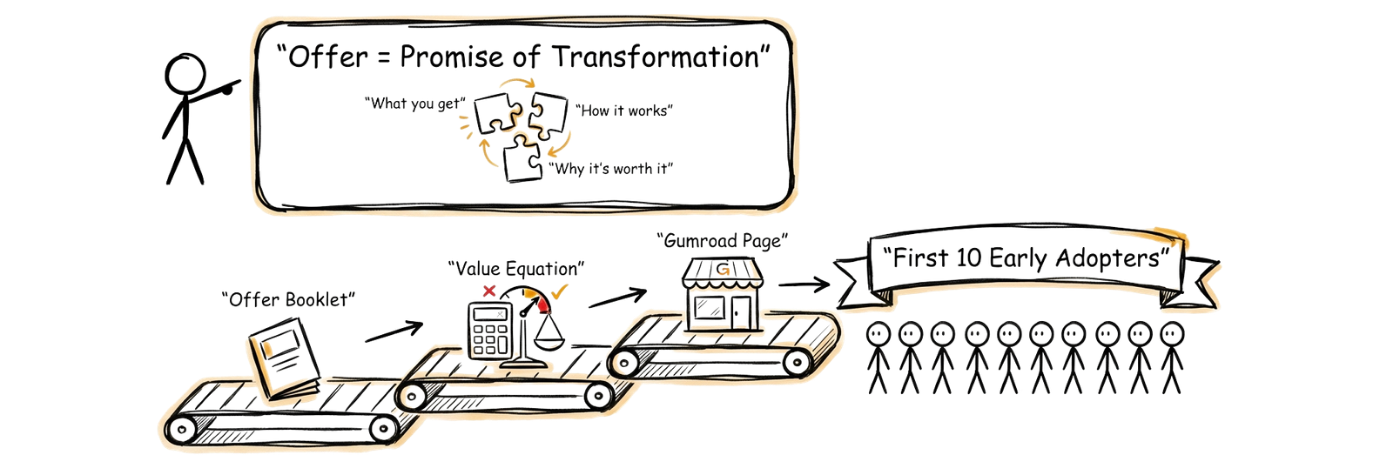
The 10 PDF
Section titled “The 10 PDF”
The offer is a 4–5 page PDF that describes the Sleep Tracker in beautiful detail, sold on Gumroad for a small price (we recommend £3). Not free. Real money from real people.
Gumroad is a platform that lets you sell digital products (PDFs, courses, templates) with no monthly fees. You upload the file, set a price, and share the link. Payments go straight to your account. It takes about ten minutes to set up.
Why does charging matter? Free downloads tell you nothing. Someone will download a free PDF out of mild curiosity and never open it. But when someone pays real money, they are telling you that the problem is real enough and the promise is clear enough to spend actual money on. That is signal. That is validation.
Your goal in Part 2 is to find ten early adopters who will each pay for the Sleep Tracker offer. That is not life-changing money. It is proof. Proof that someone values what you are building enough to pay for it before it exists.
Part 1: Build Your Offer
Section titled “Part 1: Build Your Offer”Step 0: Open Your Terminal and Start Claude Code
Section titled “Step 0: Open Your Terminal and Start Claude Code”Before you can run any prompts, you need a terminal open and Claude Code running.
- Open a terminal. If you have not used a terminal before, follow the Using the Terminal guide.
- Navigate to your vault folder:
cd ~/Documents/sleep-tracker
- Start Claude Code:
claude
Once Claude Code is running and waiting for input, continue to Step 1.
Step 1: Generate the Offer Booklet
Section titled “Step 1: Generate the Offer Booklet”The offer-booklet-builder skill reads your vault files and generates a complete 7-section booklet, saved to your 05_output/ directory.
The offer-booklet-builder skill has activated. Reading your vault files...

Read: 00_brand/tone_of_voice.md
Read: 01_offer/offer_definition.md
Read: 02_audience/target_avatar.md

Generating 7-section offer booklet...

Booklet saved to: 05_output/offer_booklet.md

Here is a summary of each section:

1. Cover
 Product: Sleep Tracker
 Tagline: From guessing to knowing — track your sleep, spot the patterns
 Author: [Your Name]

2. The Offer
 A step-by-step guide and companion app that takes you from
 guessing about your sleep to seeing actual patterns. You notice
 that Tuesday and Thursday you slept under six hours. You spot
 the connection between late screen time and poor quality ratings.

3. Who It's For
 People aged 20–40 who know their sleep is not great but have
 never tracked it consistently. They have tried Sleep Cycle or
 Apple Health but found them too complicated or too invasive.
 They want something simple.

4. What You Get
 - The Sleep Tracker app (4 screens: Home, Log Entry, History,
   Insights)
 - Step-by-step build guide using Claude Code
 - Pre-built screens and features
 - Full source code to customise and extend

5. How It Works
 Day 1: Set up your vault and define the offer
 Day 2: Build the app with Claude Code
 Day 3+: Start logging your sleep and see patterns emerge

6. Pricing
 Price: £3 (one-time purchase)
 Comparison: less than a single coffee. This gives you the app,
 the source code, and the method.

7. Next Steps
 Purchase link: [to be added after Gumroad setup]
 Guarantee: 30-day money-back, no questions asked.

Review each section in the booklet file and edit anything that does
not sound right before converting to PDF.
LLM outputs are non-deterministic and may vary from this example.
The booklet contains these 7 sections:
- Cover: product name, tagline, and author
- The Offer: what the Sleep Tracker is and the transformation it delivers
- Who It’s For: ideal customer profile and who it is not for
- What You Get: deliverables with descriptions
- How It Works: step-by-step buyer journey
- Pricing: price, value comparison, and call to action
- Next Steps: purchase link and reassurance
Review each section and edit anything that does not sound right before converting to PDF.
Step 2: Convert to PDF
Section titled “Step 2: Convert to PDF”Once you are happy with the booklet content, convert it to a branded PDF ready for Gumroad.
The booklet-to-pdf skill has activated.

Reading: 05_output/offer_booklet.md
Reading: 00_brand/tone_of_voice.md (for brand guidelines)

Checking sections...
Section 1 (Cover): OK
Section 2 (The Offer): OK
Section 3 (Who It's For): OK
Section 4 (What You Get): OK
Section 5 (How It Works): OK
Section 6 (Pricing): OK
Section 7 (Next Steps): OK

No thin sections detected. Generating PDF...

PDF generated successfully.

File: 05_output/offer_booklet.pdf
Format: A4 portrait
Pages: 9
Size: 247 KB
Font: Satoshi (from Sleep Tracker brand guidelines)

The PDF is ready to upload to Gumroad. Open the file to review the
layout, spacing, and readability before publishing.
LLM outputs are non-deterministic and may vary from this example.
This skill requires Python and ReportLab Setup. If you do not have them installed, you can use Obsidian’s built-in PDF export as an alternative.
Step 3: Validate with the Value Equation
Section titled “Step 3: Validate with the Value Equation”Before you start promoting, run your offer through the Hormozi Value Equation to identify weak spots.
The offer-validator skill has activated.

Reading: 01_offer/offer_definition.md
Reading: 02_audience/target_avatar.md
Reading: 01_offer/value_equation.md

Scoring your offer against the Hormozi Value Equation...

═══════════════════════════════════════════════════
OFFER VALIDATION REPORT
═══════════════════════════════════════════════════

Product: Sleep Tracker
Date: 2026-02-22

───────────────────────────────────────────────────
INDIVIDUAL SCORES
───────────────────────────────────────────────────

Dream Outcome: 8/10
Self-awareness through data. Not perfect sleep, but replacing
guessing with actual patterns. Users see a chart of their last
week, notice the nights they slept under six hours, and spot the
connection between late screen time and poor quality ratings.

Perceived Likelihood: 7/10
Step-by-step guide using Claude Code. No coding experience
required. The build is contained enough to finish in a weekend.
But completing the build still requires real effort on the
user's part, which keeps this below a 9.

Time Delay: 2/10
Build the app in a single day. First sleep entry goes in that
evening. By the end of the week, enough data to see patterns.
Near-immediate results.

Effort & Sacrifice: 3/10
A laptop and a Claude account. Real but manageable. No wearable,
no cloud account, no subscription. Everything stays on the phone.

───────────────────────────────────────────────────
OVERALL VALUE SCORE
───────────────────────────────────────────────────

Formula: (Dream Outcome x Perceived Likelihood)
/ (Time Delay x Effort & Sacrifice)

Calculation: (8 x 7) / (2 x 3)
= 56 / 6
= 9.3

Score: 9.3 -- Exceptional

═══════════════════════════════════════════════════

Updated: 01_offer/value_equation.md with full scoring breakdown.
LLM outputs are non-deterministic and may vary from this example.
Interpreting Your Score
Section titled “Interpreting Your Score”| Score | Meaning |
|---|---|
| 1.0–2.0 | Weak: friction outweighs the promise |
| 2.1–4.0 | Moderate: has potential but at least one component is dragging it down |
| 4.1–6.0 | Good: solid fundamentals |
| 6.1–8.0 | Strong: compelling value proposition, focus on distribution |
| 8.1–10.0 | Exceptional: protect what works, start scaling |
After making changes based on the recommendations, run the validator again with your updated details.
Step 4: Set Up Gumroad
Section titled “Step 4: Set Up Gumroad”With your offer booklet PDF ready, you need somewhere to sell it.
Guide generated and saved to: 05_output/gumroad_setup_guide.docx

The guide covers the following sections, pre-filled with your offer
details:

1. Create Your Gumroad Account
 - Sign up at gumroad.com
 - Email verification
 - Profile setup (display name, bio, profile picture)

2. Set Up Payments
 - Connect your bank account or PayPal
 - Tax information (W-8BEN for non-US sellers)
 - Currency settings (GBP recommended)
 - Understanding Gumroad's fee structure (10% flat fee)

3. Create Your Product Listing
 - Click "New Product" and select "Digital Product"
 - Product name: Sleep Tracker (pre-filled)
 - Price: £3 (pre-filled)
 - Product description: pre-filled from your gumroad_landing.md

4. Upload Your PDF
 - Upload 05_output/offer_booklet.pdf as the deliverable
 - Set the file name buyers will see on download
 - Optional: add a cover image (1280x720 recommended)

5. Preview and Publish
 - Use "Preview" to check your listing as a buyer would see it
 - Click "Publish" to make it live
 - Copy your product URL for sharing
LLM outputs are non-deterministic and may vary from this example.
Once your product page is live, update 01_offer/gumroad_landing.md with your final listing URL.
Part 2: Finding Your 10
Section titled “Part 2: Finding Your 10”Why 10?
Section titled “Why 10?”You have a vault. You have an offer scored with the Value Equation. You have a Gumroad page ready to take money. Now you need 10 people to pay for your offer.
Why 10? Because 10 is small enough to find without advertising, without an audience, without a following. You do not need a marketing strategy. You need a phone and some courage.
Ten is also enough to mean something. One sale could be a favour. Two could be a coincidence. Ten people, each spending their own money, is a pattern. It tells you the offer has value. It gives you 10 early adopters who are now invested in what you build. They will test your product, give you feedback, and tell you honestly whether it works.
Start Warm
Section titled “Start Warm”Start with the people closest to you. Always warm.
Hormozi’s Core Four says there are four ways to let people know about your offer: warm outreach, cold outreach, content, and paid ads. For your first 10 sales, only one of those matters. Warm outreach. People who already know you.
But here is a detail most books skip: start with the warmest of the warm. Your closest, most supportive friends and family. Not the sceptic uncle who questions everything you do. Not the mate who sends the eye-roll whenever you mention a side project. Start with the people who would cheer you on even if the idea was terrible.
Why? Because the first ask is the hardest. Your hands will shake a bit. Your message will be slightly too long. You will check your phone every ninety seconds waiting for a reply. That is normal. Everyone feels it. The trick is to make that first ask to someone who will respond kindly, whether they buy or not. You are building confidence, not just collecting sales.
Once you have two or three yeses from your inner circle, the next ten messages get easier. You have proof it works. You have language that landed. You have momentum.
So make a list. Open your phone contacts. Scroll through LinkedIn. Think about WhatsApp groups, old team chats, the people you play five-a-side with. You are looking for anyone who has ever complained about poor sleep, mentioned wanting better habits, or expressed interest in health tracking. Write down 30 names. Rank them: the first five should be people you would call if you had a flat tyre at midnight. The rest can be looser connections. You will not message all 30. But having the list removes the “I don’t know who to ask” excuse.
Step 5: Build Your Prospect List
Section titled “Step 5: Build Your Prospect List”I have read your vault files: 02_audience/target_avatar.md -- your ideal customer 01_offer/offer_definition.md -- your offer details Now I need to learn about your network to identify the 20 strongest prospects. Let me ask about each area one at a time. Colleagues and former colleagues: 1. Who are the people you work with (or have worked with) who have mentioned poor sleep or being tired at work? 2. Anyone who has complained about waking up exhausted or never feeling rested? [You answer with names and context...] Online communities: 3. Which Slack groups, Discord servers, or online communities are you active in? 4. Who in those communities has posted about sleep habits, health tracking, or building with AI tools? [You continue providing names...] Based on your answers, here are your 20 strongest warm prospects: # Name How you know them Why they fit 1 [Name] Current colleague Mentioned poor sleep habits in a team standup last month 2 [Name] Former manager Complained about waking up tired every Monday 3 [Name] University friend Interested in health tracking and wearables ... Each row also has blank columns for LinkedIn URL and Email for you to fill in before moving to the next step.
LLM outputs are non-deterministic and may vary from this example.
Step 6: Write Personalised Messages
Section titled “Step 6: Write Personalised Messages”Every outreach message follows a 4-part formula:
- Personal hook: a genuine, specific reason you are reaching out to this person
- Value lead: share something useful before asking for anything
- Bridge: connect what you shared to your offer without pitching
- Soft CTA: ask for their opinion or feedback, not their money
Reading: 00_brand/tone_of_voice.md
Reading: 01_offer/offer_definition.md

Here are your 3 outreach templates. Each follows the 4-part
structure and stays under 150 words.

TEMPLATE 1: LinkedIn DM

[PERSONAL HOOK -- Write 1-2 sentences specific to this person.
Example: "I saw your post about being exhausted after that
conference" or "I remember you mentioning poor sleep last month."]

I have been working on something you might find interesting. I
put together a simple sleep tracking app that helps you log your
sleep and see patterns over time. No wearable, no cloud account,
just four screens on your phone.

I am looking for 10 early adopters to try it out and shape the
final product. Would love your honest take on whether it resonates.
No pressure at all.

TEMPLATE 2: Email

Subject: Quick question about sleep tracking

[PERSONAL HOOK -- Write 1-2 sentences specific to this person.]

I have been building a mobile app that helps you log your sleep
and spot patterns over time, as part of a methodology I am
learning. It uses Claude Code to build working software from
scratch. The app is deliberately simple: four screens, no account,
everything stays on your phone.

Would you be interested in being one of the first 10 people to
try it? I would really value your feedback.

TEMPLATE 3: Text / WhatsApp

[PERSONAL HOOK -- 1-2 casual sentences.]

I have been building a simple sleep tracker app. Thought of you
because I know you have mentioned poor sleep before. Looking for
10 people to try it and give honest feedback. No sales pitch,
genuinely just want to know if it is useful. Interested?

Remember: fill in the [PERSONAL HOOK] for every single message
before sending.
LLM outputs are non-deterministic and may vary from this example.
The Ask Pattern
Section titled “The Ask Pattern”Follow this pattern for every conversation: Acknowledge, Share, Describe, Ask.
- Acknowledge. Start with something genuine. Reference a conversation you had, something they posted, a shared experience.
- Share. Tell them what you are working on. Keep it brief.
- Describe. Explain who it is for and what it does.
- Ask. “I am looking for 10 early adopters who will pay £3 to get early access and shape the final product. Do you know anyone who might be interested?”
Notice the phrasing. You are not asking them to buy. You are asking if they know anyone. This removes the pressure. If they are interested, they will say so. If they are not, they can suggest someone else without feeling awkward.
Handling Rejection
Section titled “Handling Rejection”Most people will say no. That is normal. That is the job.
If someone says “no thanks,” accept it gracefully and move on. Do not chase. Do not argue. Do not explain why they should want it. A clean “no worries, thanks for reading it” preserves the relationship and leaves the door open for next time.
But pay attention to the flavour of the no:
- “No, I am not interested in sleep tracking” tells you it did not land with that person. Fine.
- “No, I would rather use an existing app” tells you something about the competitive space. Useful.
- “I would, but the price feels like a lot for something that is not built yet” tells you the price or the timing needs work. Very useful.
The most valuable response is “I would, but…” Everything after the “but” is product feedback. Write it down. If three people say the same “but,” that is a signal worth acting on. Maybe you need to adjust the price. Maybe you need to explain the offer differently. Maybe the dream outcome is not clear enough. Each “but” sharpens the offer.
Step 7: Create a Tracking Sheet
Section titled “Step 7: Create a Tracking Sheet”CSV file generated and saved to: 05_output/outreach_tracker.csv The file contains 20 rows (one per prospect) with 15 columns. Pre-filled columns: Name and Why they fit (from your prospect list). All status and date columns are blank, ready for you to update as you send messages and receive responses. Open the file in Google Sheets or Excel. Suggested workflow: 1. Fill in LinkedIn URLs and emails for all 20 contacts 2. Choose a contact method for each person 3. Personalise a message using your templates 4. Send the message and record the date 5. Update the status as responses come in 6. Schedule follow-ups 5-7 days after each unanswered message
LLM outputs are non-deterministic and may vary from this example.
Key Principles
Section titled “Key Principles”- Lead with value, not a pitch. Share something useful before asking for anything.
- Be specific. Mention why you thought of this person specifically.
- Follow up with a reason. Each follow-up should add new value. Never send a bare “just checking in.”
- Ask for feedback, not a sale. Early conversations are about learning what resonates.
- Track everything. Update your tracking sheet after every interaction.
What Comes Next
Section titled “What Comes Next”Once you have a validated offer, a live Gumroad page, and (if you did the work) your first paying customers, move on to the Ship page. That page introduces the SpecKit workflow and walks you through building the Sleep Tracker app with Claude Code.